
Overview
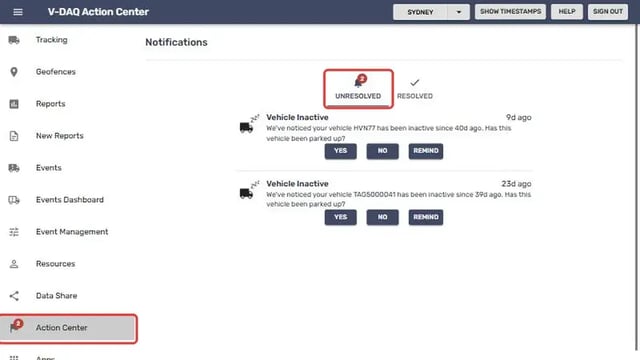
The Action Center is where V-DAQ sends notifications that need a response from you. When a vehicle hasn't been active for a while, you will receive a Vehicle Inactive notification asking whether the vehicle has been parked up. Your answer tells V-DAQ whether the vehicle is parked up or may have a device problem. The red number on Action Center in the left menu shows how many notifications are waiting.
Before You Begin
- You need access to the V-DAQ Platform.
- Check whether the vehicle is parked up, for example off the road for repairs, seasonal work or sale.
Step 1 – Open the Action Center
Select Action Center in the left menu.The Unresolved tab opens, showing notifications that still need a response.
Step 2 – Respond to the notification
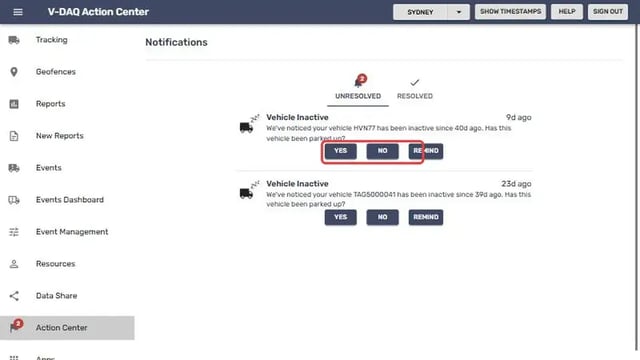
Each Vehicle Inactive notification names the vehicle and how long it has been inactive. Select one of the buttons:
YES: the vehicle has been parked up. The notification moves to the Resolved tab.NO: the vehicle has not been parked up and should be reporting.
Important
If you select NO, V-DAQ Support may contact you to check the device and resolve any malfunction
If an inactive notification is not been responded to, the "Inactive Since" time will continue from previous inactivity. Regularly using the platform to communicate your vehicle activity will keep your platform accurate and keep dates relevant to your operations.

Related Articles
Need More Help?
If you're still experiencing issues:
Phone: (02) 4204 8472
Email: support@v-daq.com.au