
Overview
When a vehicle is enrolled in a Regulatory Telematics service, V-DAQ issues a Certificate of Enrolment for that vehicle. It's the proof that the vehicle is enrolled, and you may need to show it to a road authority. V-DAQ recommends keeping a copy of your current certificate in the vehicle.
- Each vehicle has one current certificate.
- Certificates don't expire. A certificate stays valid while the vehicle's enrolment is active.
- If the enrolment details change, a new certificate is issued and replaces the old one.
Before You Begin
- You need access to the V-DAQ Platform.
- The vehicle must have an active Regulatory Telematics service.
Step 1 – Find the certificate
Select Account in the left menu. The Documents tab opens.Turn off Only Pending Review to show all documents.
Type the vehicle registration in Search.
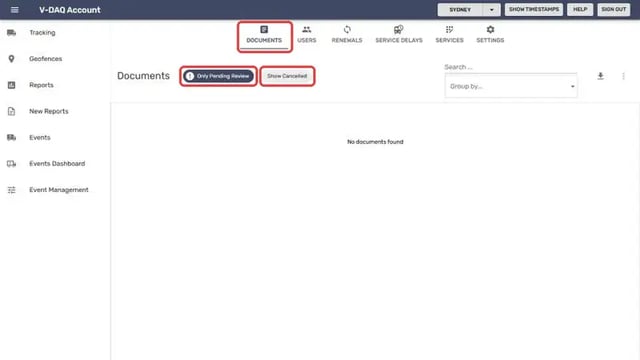
Step 2 – How do I open or download the certificate?
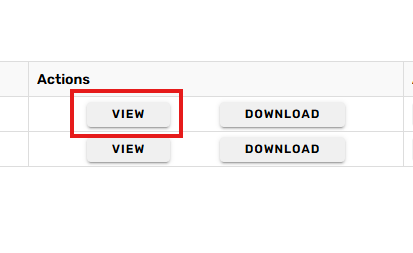
- Locate your certificate and select View in the Actions column to open it.
- Download a copy if you need to print it or keep it in the vehicle. For instructions, see the related article Download a document.
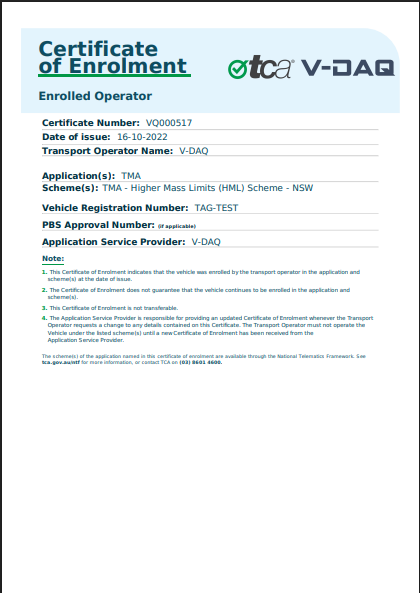
Step 3 – Check the details
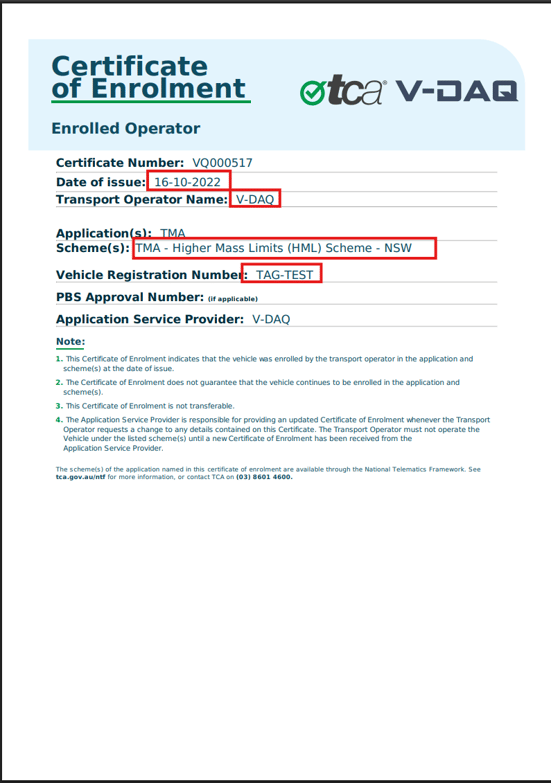
Check that these details on the certificate are correct:
- The vehicle registration
- Your business name
- The service or scheme the vehicle is enrolled in
- The date the certificate was issued. It should be the date of the most recent change to the enrolment.
Important
If any detail is wrong, or the vehicle's registration has changed, contact V-DAQ Support. We'll update the enrolment and issue a new certificate.
Where can I find related articles?
Need More Help?
If you cannot locate the certificate, or any of the details look incorrect, contact V-DAQ Support. Please have the vehicle registration, your business name and the service the vehicle is enrolled in ready, so we can help you quickly.
Phone: (02) 4204 8472
Email: support@v-daq.com.au