
Overview
The odometer and engine hours recorded against a vehicle are used for maintenance tracking and reporting. If the platform reading no longer matches the vehicle's dashboard, you can set it manually from the vehicle's edit window. The platform shows the date of the last manual update above each field.
Before You Begin
- You need access to the V-DAQ Platform.
- Have the current odometer reading (km) and engine hours from the vehicle's dashboard.
Important
Enter the readings exactly as they appear on the dashboard when you save. Readings are in kilometres and hours.
Step 1 – Open the vehicle
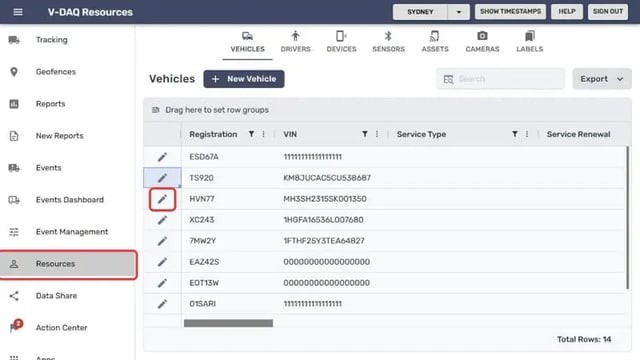
Select Resources in the left menu. The Vehicles tab opens.Select the pencil icon next to the vehicle you want to update.
Step 2 – Enter the odometer and engine hours
In the Edit Vehicle window, scroll down to the Maintenance section.Enter the reading in Odometer (km).
Enter the reading in Engine Hours.
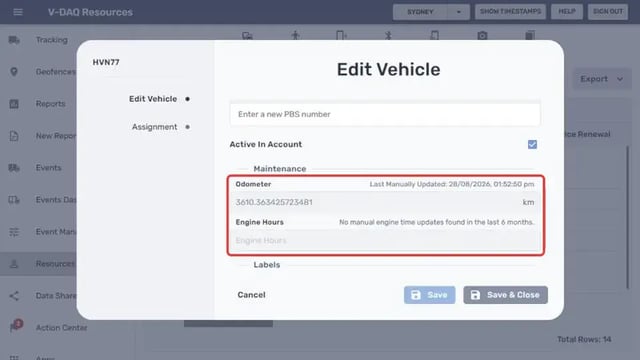
The text above each field shows when it was last updated manually, for example Last Manually Updated: 28/08/2026, or No manual engine time updates found in the last 6 months.
Step 3 – Save your changes
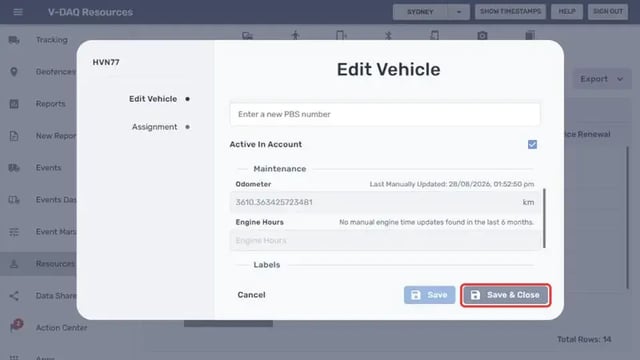
Select Save & Close.To close without changing anything, select Cancel.
Related Articles
Need More Help?
If you're still experiencing issues:
Phone: (02) 4204 8472
Email: support@v-daq.com.au