
Overview
This article covers how to edit an existing API key in the V-DAQ API app.
You can change the name and the permissions of an API key. You can't change the API key itself. If you need a new API key, delete the old one and create a new one.
Before you begin
Changes to permissions apply to the integration straight away. If you remove access to a data type or vehicle, tell your integration partner first.
Step 1 – Open the V-DAQ API app
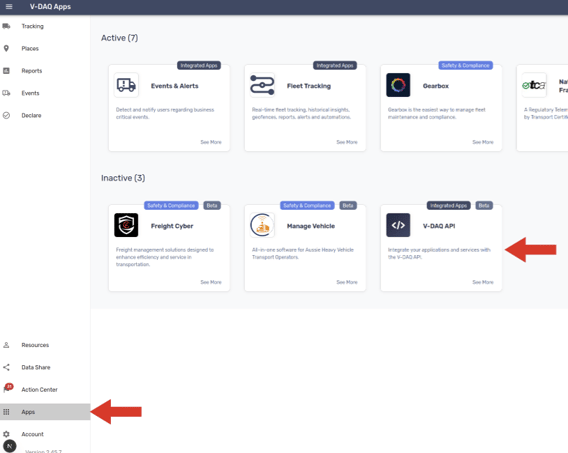
Go to Apps and click the V-DAQ API app tile. The key management page opens.
Step 2 – Edit the API key
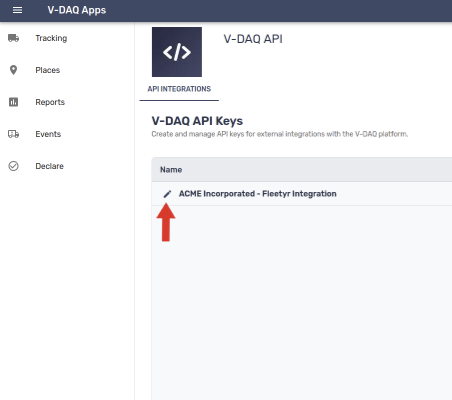
Find the API key you want to change. Click its edit button.
Step 3 – Change the name or permissions
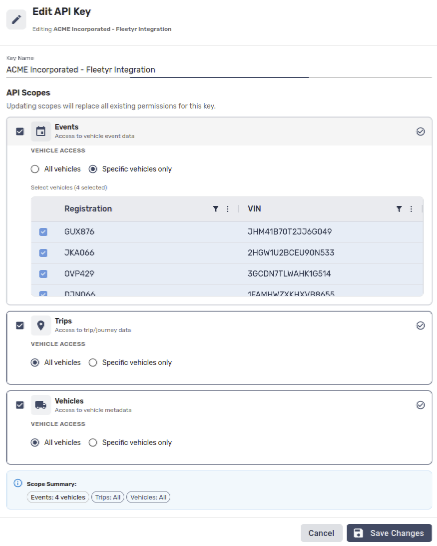
The edit dialog opens. Change the name, the scopes or the permissions as needed.
Note: All Vehicles includes vehicles you add to your account in the future.
Step 4 – Save changes
Click Save changes.
Need more help?
If you're still experiencing issues:
Contact the V-DAQ Support Team: (02) 4204 8472
Send us an email: support@v-daq.com.au